Research desk
Testing Log & Screenshot Checklist
This page turns gameplay into publishable evidence. Use it to track which Animal Hospital facts are official, community-sourced, conflicted, or verified in the current build.
How to add a new verified fact
- Record the run or take screenshots before the event disappears.
- Rename images with the target filename style, for example
animal-hospital-three-eyes-front-desk.png. - Place the file in the matching folder under
public/images/. - Update
data/research.tswith the screenshot path, tested date, and status. - Move the guide fact from “community” or “needs testing” to “verified in game” only after the evidence matches the current build.
Capture queue
Screenshot checklist
Use these target filenames when you capture evidence in-game. Drop the images into the listed folders and the matching cards can be published later.
Normal patient at front desk
/images/research/official-waiting-room-patients.pngCapture a clean normal patient before check-in. Keep UI visible enough to prove the intake context.
Three Eyes visual anomaly
/images/anomalies/three-eyes-front-desk.pngCapture the patient at the front desk before admission. The extra eye should be obvious in the crop.
Incorrect photo mismatch
/images/anomalies/incorrect-photo-mismatch.pngCapture both the patient and the photo evidence if possible. The mismatch should be named in the note.
CCTV-only anomaly
/images/anomalies/official-void-hallway-entity.pngCapture the CCTV monitor/feed and record which sign appeared only on camera.
Treatment room patient context
/images/treatments/official-treatment-room-patient.pngOfficial media provides treatment-room context. A separate item shelf screenshot is still useful later.
Room 8 surgery prompt
/images/rooms/room-8-surgery-prompt.pngCapture the surgery UI after the timer starts. Avoid cropping away the prompt or timer.
Patient on Fire emergency
/images/events/official-hostile-room-event.pngOfficial media provides hostile-event context. A specific fire screenshot is still useful later.
Barney dialogue choice
/images/story/barney-dialogue-choice.pngCapture each dialogue step separately. Mark spoilers clearly before publishing.
Evidence cards
Anomaly testing table
Each card records the detection channel, visible sign, action, screenshot slot, and current verification state.
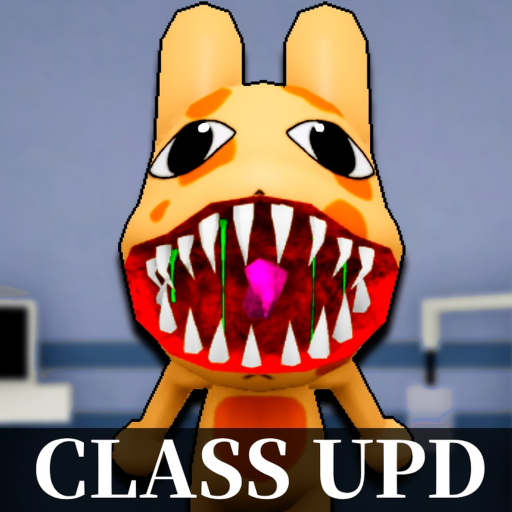
Wide Eyes & Sharp Teeth
Sign: Oversized eyes, distorted grin, or sharp teeth visible on the patient model.
Action: Reject at intake after confirming the sign.
OfficialOfficial Roblox media shows the visual style; exact in-game rejection behavior still needs live testing.Three Eyes
Sign: Extra glowing eye visible before admission.
Action: Reject at intake.
Needs testingHigh-priority screenshot because the search intent is clear and easy for players to recognize.Incorrect Photo
Sign: Photo evidence shows ears, horns, colors, or eyes that do not match the patient.
Action: Reject at intake after comparing patient and photo.
Needs testingCapture a side-by-side if the UI allows it.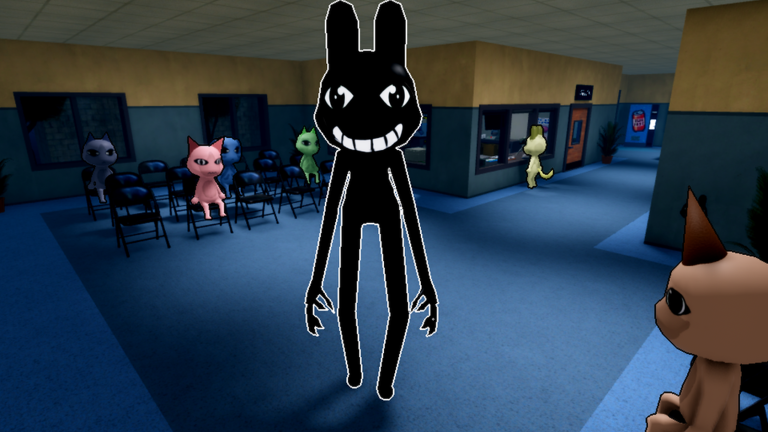
Unnatural Body
Sign: Body appears stretched, broken, blacked out, or otherwise distorted on camera.
Action: Reject at intake; do not admit the patient.
OfficialOfficial Roblox media shows a black hallway entity. Exact CCTV-only behavior still needs live testing.Clinical tests
Treatment verification
Incident tests